 Sign in

Outperform now
Make work feelfun like sport
Plecto is a performance management platform that turns sales and support data into real-time KPI dashboards, contests and coaching that motivate teams.
Trusted by ambitious teams
that want to outperform


Use cases
Performance customizedto your business
Plecto adapts to the numbers, goals, and workflows that matter to your business. Choose your team or industry to see what that looks like in practice
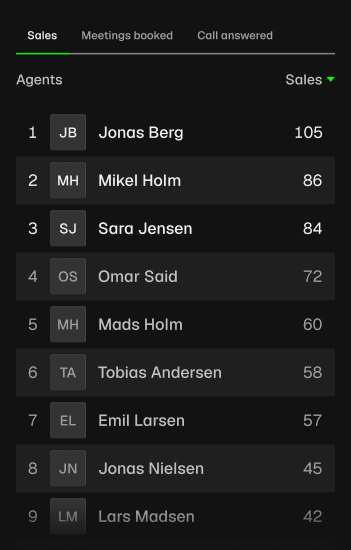
Track custom KPIs
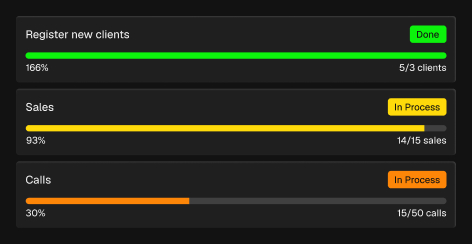
Set motivating goals and targets
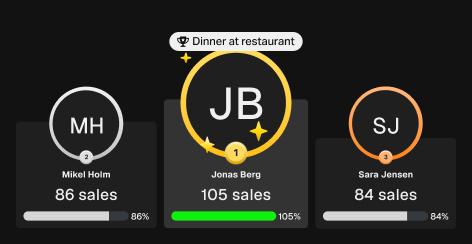
Run weekly contests and celebrate
Weekly reports sent automatically
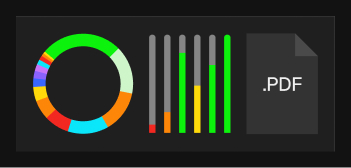
150+ integrations
How it works
Turn your data intobetter performance
Connect your data
Connect your data into Plecto with one of our 150+ integrations and keep your numbers automatically up to date.
Custom KPIs
Choose exactly what you want to measure and how it should be calculated, so Plecto reflects the way your business actually works.
Build real-time dashboards
Create live dashboards with our AI builder and templates, or build them completely custom. Give everyone a clear view of performance as it happens.
Motivate with goals and contests
Set goals for people and teams, and turn them into competitions. Connect individual performance to company targets and give people something clear to work toward.
Recognize progress as it happens
Celebrate everything from small wins to record-breaking results with live notifications, achievements and streaks. Make great performance recognized.
Automate your reporting
Pull reports directly from your data without manual work. Get the numbers you need quickly and export them in the format that works for you.
Customer success stories
Companies we madeperform better
 Jyllands-Posten
Plecto Helps Danish Newspaper Boost Sales 27%
See how Jyllands-Posten’s Direct Sales team swapped whiteboards for Plecto’s live dashboards and gamification—and increased sales revenue by 26.9% in three years.
Read more

Morten Thybo
Performance and Operational Data Specialist, Jyllands-Posten
 Aller Media
Aller Media Gen Z Sales Team Doubles Annual Campaign Revenue with Plecto
How do you motivate a Gen Z sales team with an average age of 22 and constant turnover? Aller Media brought Plecto’s gamification front-and-center—and doubled its annual campaign revenue from 370,000 to 760,000 DKK in a single year.
Read more

Søren Alexandersen
Backoffice CS Agent
Return on investment
Calculate what it’sworth to your business
$10,000$1,000,000€1,000,000DKK 7,000,000
10 people250 people
15%22.5%
Net gain after 12 months
+$13,536
You get back 4.0× the cost of Plecto.You get back 88.8× the cost of Plecto.Move the lift slider to see your result.Without PlectoWith PlectoPlecto cost
Today6 months12 months
Frequently askedquestions
Plecto is a performance management platform that turns sales and support data into real-time KPI dashboards, contests and coaching that motivate teams.
Get a clear view of your numbers without spending hours setting things up or hunting for answers. Put your data on screens, at your desk or in your pocket. Spend less time tracking performance and more time acting on it.
Plecto resides in Denmark within the European Union and must therefore adhere to the European GDPR that came into effect on May 25th 2018. We are fully compliant with GDPR and offer the following measures:
- Custom data retention per data source (e.g. delete call logs after 3 months).
- Anonymize employees when they quit (keep data, but without any personal relatable information).
If you feel that the way you use Plecto requires further security or privacy measures, we'd like to talk to you! Contact us as soon as possible: support@plecto.com.
For more information, visit plecto.com/legal/ to find a collection of our legal documents.
Go to Settings > Billing > Change subscription or upgrade. Enter the number of licenses you need and confirm.
Admins and employees with login access can view the dashboards free of charge, provided that they are not being tracked in any data source. It means that they shouldn't be sending any data to Plecto. You should only get licenses for the employees you want to track.
Contact us
Contact our sales or support team via chat, phone, or email to solve your inquiries
Europe
+45 71 99 71 60Help Center
Step-by-step guides to get you set-up or video tutorials to troubleshoot.